7 simple privacy habits for studying with AI

Whether you’re studying for a degree, developing professionally, or simply taking a course to keep your brain from turning to mush, chances are AI will be part of the process. Yes, letting AI serve up answers on a silver platter can undermine learning and critical thinking, especially since a confident-sounding answer can still be wrong. But used as a tutor, AI can genuinely help you learn, and refusing to use it altogether is already becoming a disadvantage.

But making AI work for you comes with a catch: once you share something with an AI service, you may not be able to fully take it back. A single study prompt, screenshot, or document can reveal your identity, private conversations, unpublished research, and sometimes other people’s sensitive data too. These seven habits will help you use AI without sharing more than you intended.

Jump to:
1. Files and screenshots · 2. Work and research data · 3. Group chats · 4. Personal essays · 5. Managed and shared devices · 6. AI data settings · 7. Sharing AI chats

1. Send the relevant excerpt, not the whole file or screen

The situation: You ask an AI assistant to review an assignment and upload the file with your name, email, class, and your tutor’s comments. For statistics homework, you send it the spreadsheet your group has been working in, complete with your classmates’ names, email addresses, and study year. Or you take a quick screenshot of something on your learning platform, forgetting that the browser window also shows your pinned tabs, open chats, account name, and notifications.

What are the risks: Once those details are uploaded, they are no longer sitting only on your device. They may be saved alongside the conversation and become part of AI training material. And if someone gets into your account or the AI service suffers a data breach, a quick request for study help could expose your personal information, your classmates’ details, or both. It is surprisingly easy to share too much. One university official wrote on Reddit that they had uploaded photos of sign-up sheets to Gemini, only to realize to their horror afterward that the images contained around 200 students’ email addresses. In Australia, a government employee uploaded a spreadsheet to ChatGPT containing names, contact details, addresses, dates of birth, sensitive health information, and financial commentary. The incident was classified as a data breach affecting over 2,000 people.

What to do: Give AI only what it needs, not everything you have. Paste the relevant passage and take a few seconds to check files and screenshots for names, email addresses, IDs, notifications, or anything else you did not mean to share.
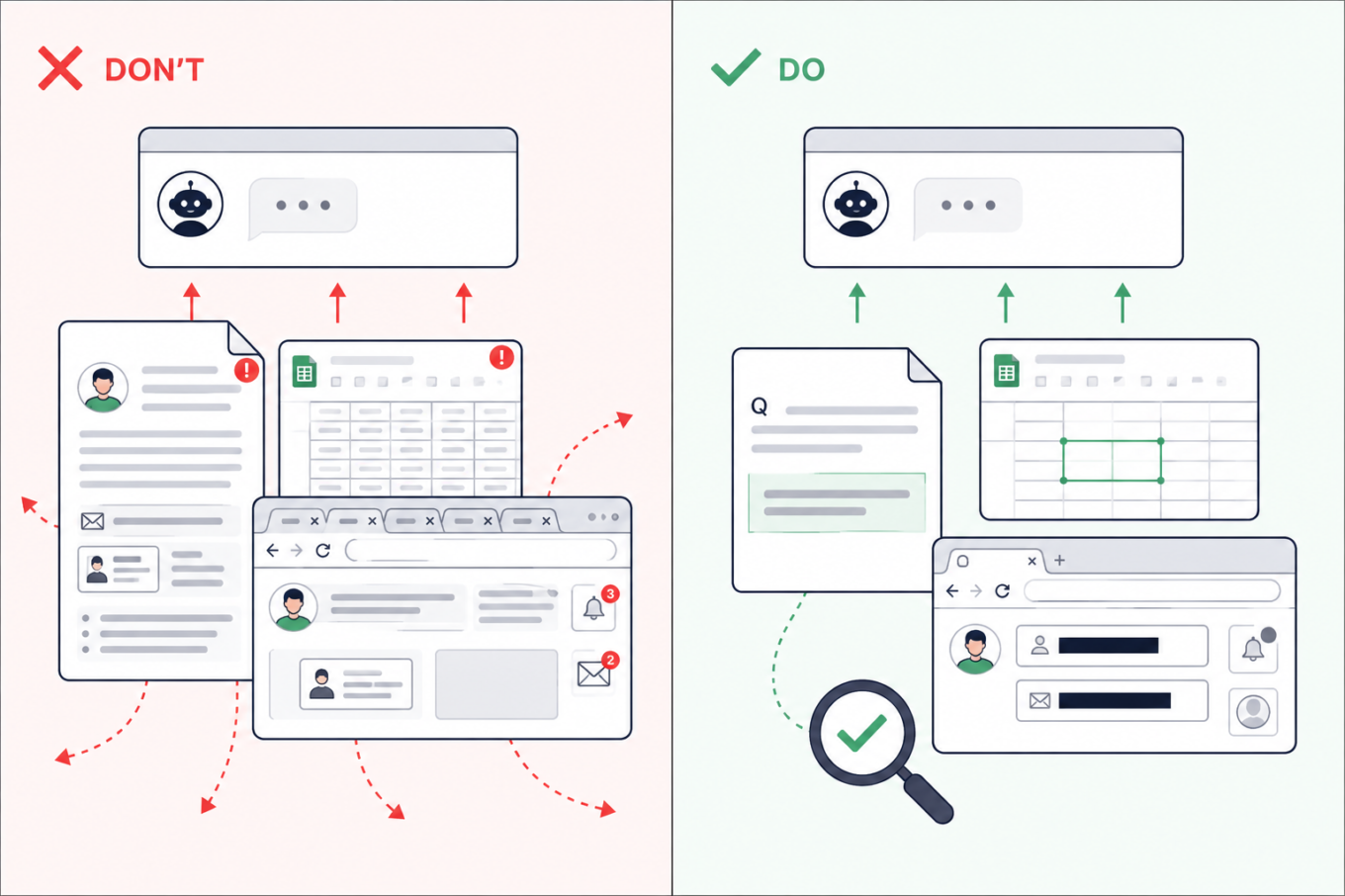
Don’t upload an entire assignment, spreadsheet, or browser screenshot to AI. Share only the relevant passage or cells after removing names, emails, tabs, and notifications

2. Check which AI tools are approved before using work or research data

The situation: Many of us juggle work and study, so material from one easily finds its way into the other. Sometimes that is not carelessness: real company data may be part of the learning process. While working on an assignment in your personal AI account, you might ask the AI assistant about code from work, upload a company spreadsheet for data-analysis practice, or request feedback on an unpublished dissertation chapter.

What are the risks: A personal AI account may not have the protections or defaults required by your employer or university. Uploading confidential material could break an NDA or internal policy — and if the account or service is compromised, that information could be exposed. This has already caught people out. Samsung restricted generative AI after employees reportedly shared confidential source code and meeting information with ChatGPT. A PhD student also claimed on Reddit that findings from uploaded dissertation chapters later appeared in answers generated for a friend.

What to do: Use an AI service approved by your employer or university and remove details the tool does not need. If there is no approved service, keep company files, client information, unpublished findings, and anything covered by an NDA out of AI. You can still describe the problem in general terms without pasting the confidential material itself.
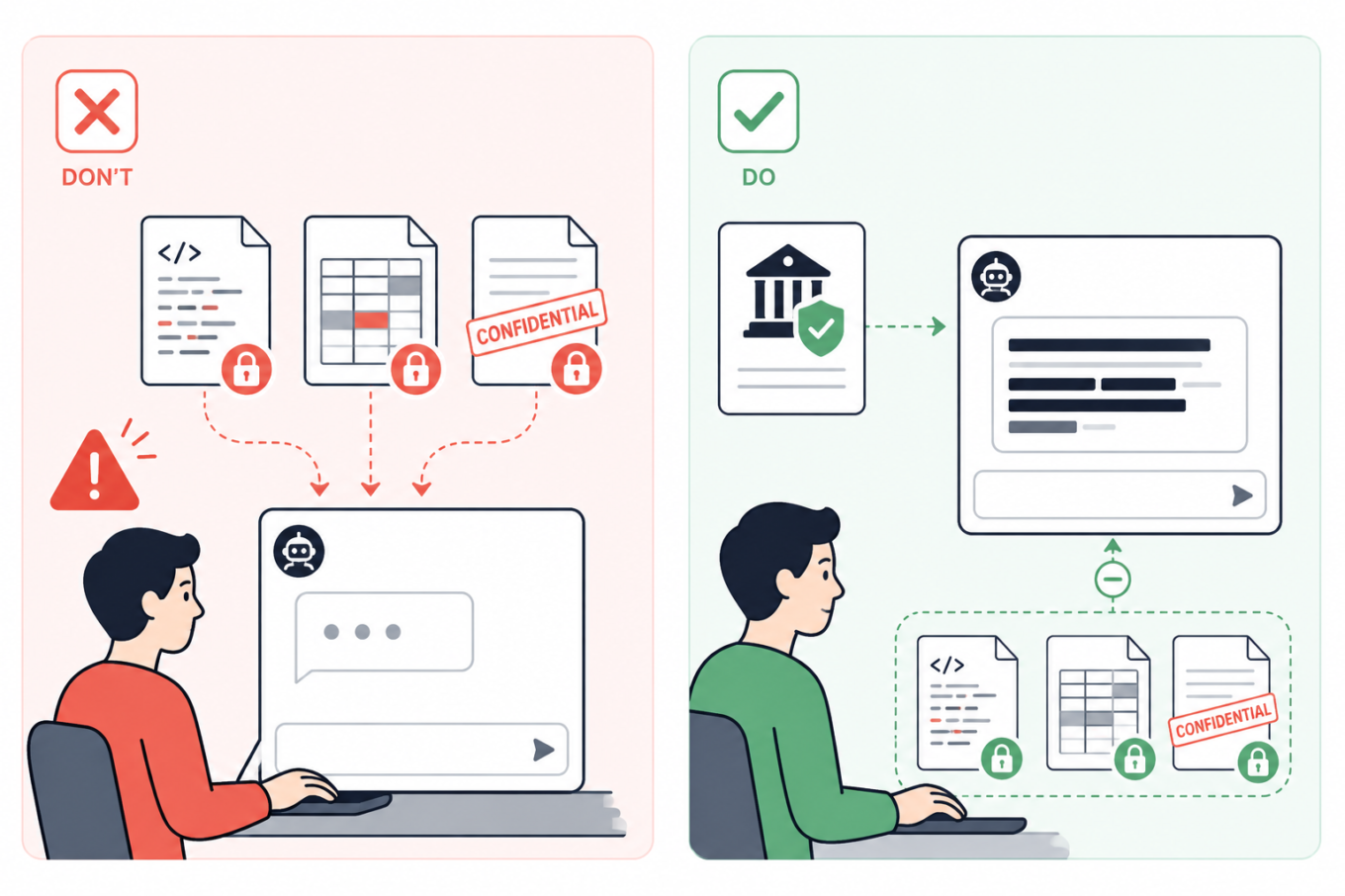
Don’t send confidential code, company data, or unpublished documents to a personal AI account. Use an institution-approved tool and keep protected files out of the chat

3. Summarize group chats yourself — or remove every name first

The situation: Your class or project chat has hundreds of messages, so you ask AI to summarize the decisions, deadlines, and tasks. But the screenshots or exported chat may also bring along people’s names, phone numbers, profile photos, personal comments, and arguments that have nothing to do with the assignment.

What are the risks: A group chat can reveal much more than expected: who people are, how to contact them, and what they discuss. Once sent to an AI service, those details may be stored with the conversation. If your account or the service is compromised, they could be exposed and help scammers create much more convincing phishing messages.

What to do: If possible, write a quick summary yourself and ask AI to turn it into a task list, meeting notes, or a study plan. That way, the assistant gets the information it needs without seeing the original conversation. If you do need to paste messages, remove names, usernames, phone numbers, profile photos, and other identifying details. Where the speakers matter, replace their names with labels such as Student A and Student B.
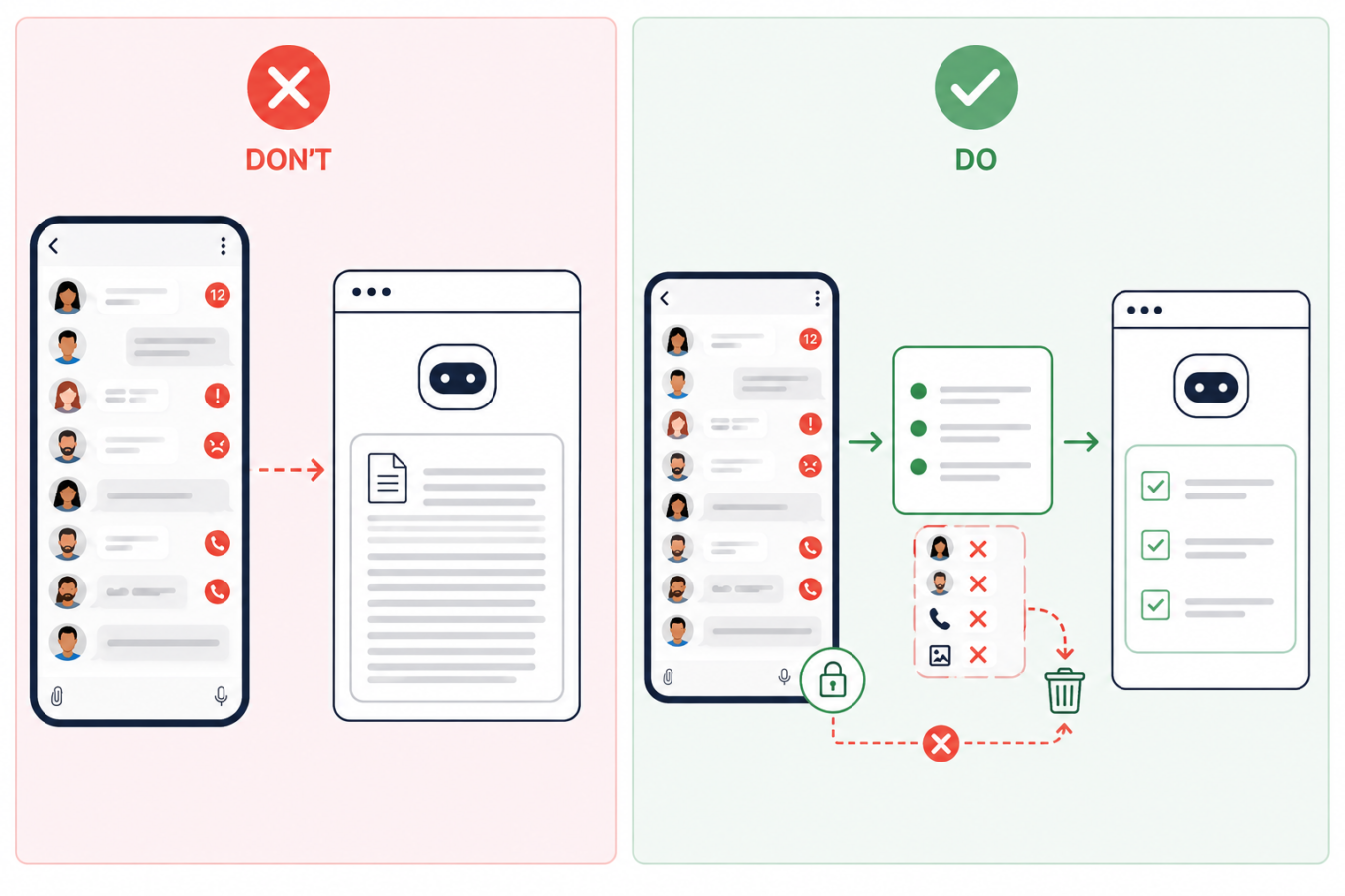
Don’t upload an entire group chat to AI. Summarize the relevant messages first and remove names, phone numbers, profile photos, and other identifying details

4. Remove identifying details from personal essays

The situation: You ask AI to edit a course application, scholarship form, résumé, cover letter, or a piece about your personal experience. Because more context often produces a better answer, it may be tempting to share a lot about your work, location, finances, health, or family.

What are the risks: A prompt does not need to contain your name to identify you. A distinctive combination of places, dates, institutions, and life events may be enough — and once the conversation has been stored, shared, or exposed, those details are difficult to take back.

What to do: Keep the context AI genuinely needs, but remove names, contact details, student numbers, exact dates and locations, and unnecessary references to a specific school or employer. A good rule of thumb is to write sensitive prompts as though the conversation could eventually become public.
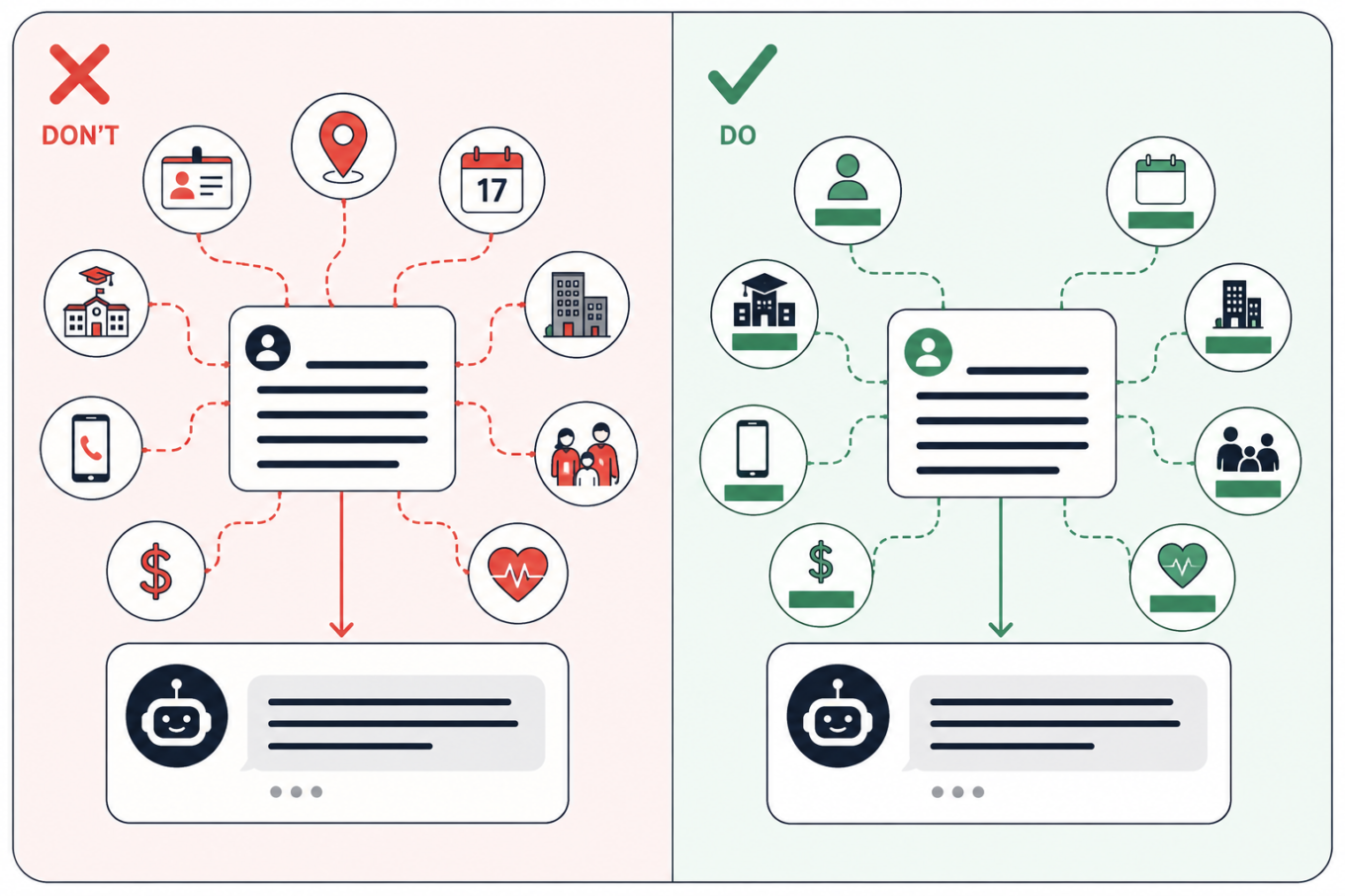
Keep the context AI needs from a personal essay, but remove details that could identify you, such as your school, employer, location, exact dates, contacts, finances, or family information

5. Keep personal searches off managed and shared devices

The situation: You open an AI assistant on a school or work laptop, or on a shared computer in a library. You start with a study question, but because the conversation feels private, you gradually drift into personal topics.

What are the risks: The device or account other than your own or created by you may be monitored — and if you forget to log out of a shared computer, someone else could read your chats. Monitoring tools can scan messages, documents, and searches for signs of violence, self-harm, or other concerning behavior. They do not always understand context. In one case reported by the Associated Press, software flagged a joke written by a 13-year-old in a monitored school chat. She was arrested, interrogated, strip-searched, spent a night in jail, and was later placed under house arrest. That case is extreme, but the same privacy risk applies to shared computers in libraries, coworking spaces, and other public places too.

What to do: Assume that activity on a managed device or account may be visible to the institution. Keep personal conversations, private writing, and sensitive searches on your own device and account. Incognito mode may hide local browser history, but it does not stop monitoring built into the device or school system.
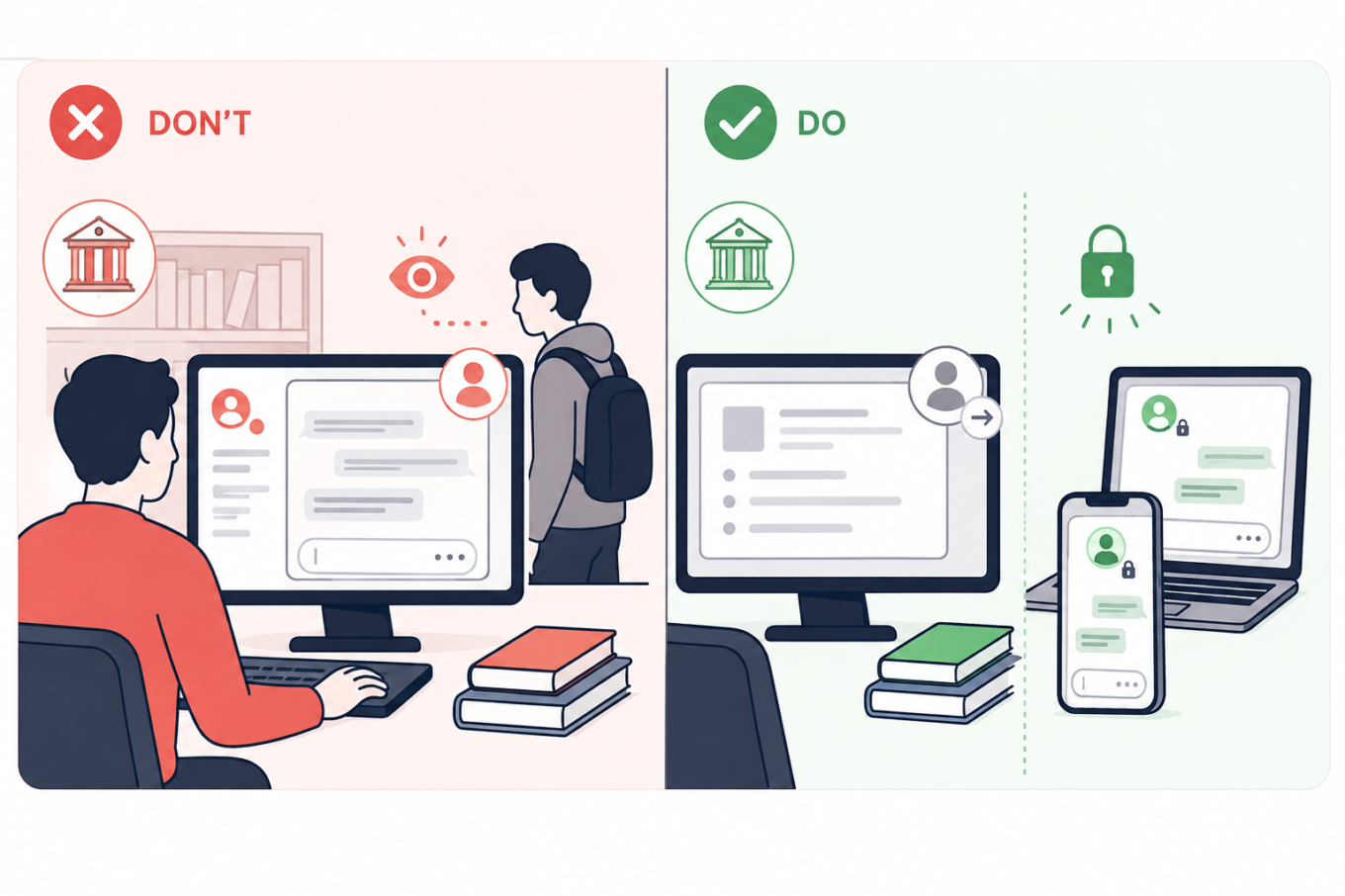
Keep school and shared computers for coursework, and use your own locked devices for personal AI conversations that should not be visible to an institution or another user

6. Turn off model training and use temporary chats for one-off questions

The situation: You use AI to summarize notes, check an assignment, or turn course materials into practice questions.

What are the risks: Depending on the service and settings, your prompts, replies, and uploaded files may remain in your chat history; details may carry into future chats; human reviewers may read some exchanges; and your content may be used to train AI models. Turning off memory does not necessarily stop training or delete past chats. In ChatGPT, regular chats remain in your history even if you turn off model training. Temporary chats are not saved to history and not used for training, but OpenAI may still retain them for up to 30 days, during which they may be reviewed. With regular Claude chats, content allowed for training may remain in de-identified training systems for up to five years, while deleted chats are normally removed from the back end within 30 days. Gemini warns that human reviewers may read some of the data it collects.

What to do: Check the service’s Privacy, Data Controls, Activity, or Model Improvement settings. Turn off optional training and use a temporary or incognito chat when you do not need to keep the conversation. Still, leave sensitive information out: the service has to process anything you send and may keep a copy for some time.
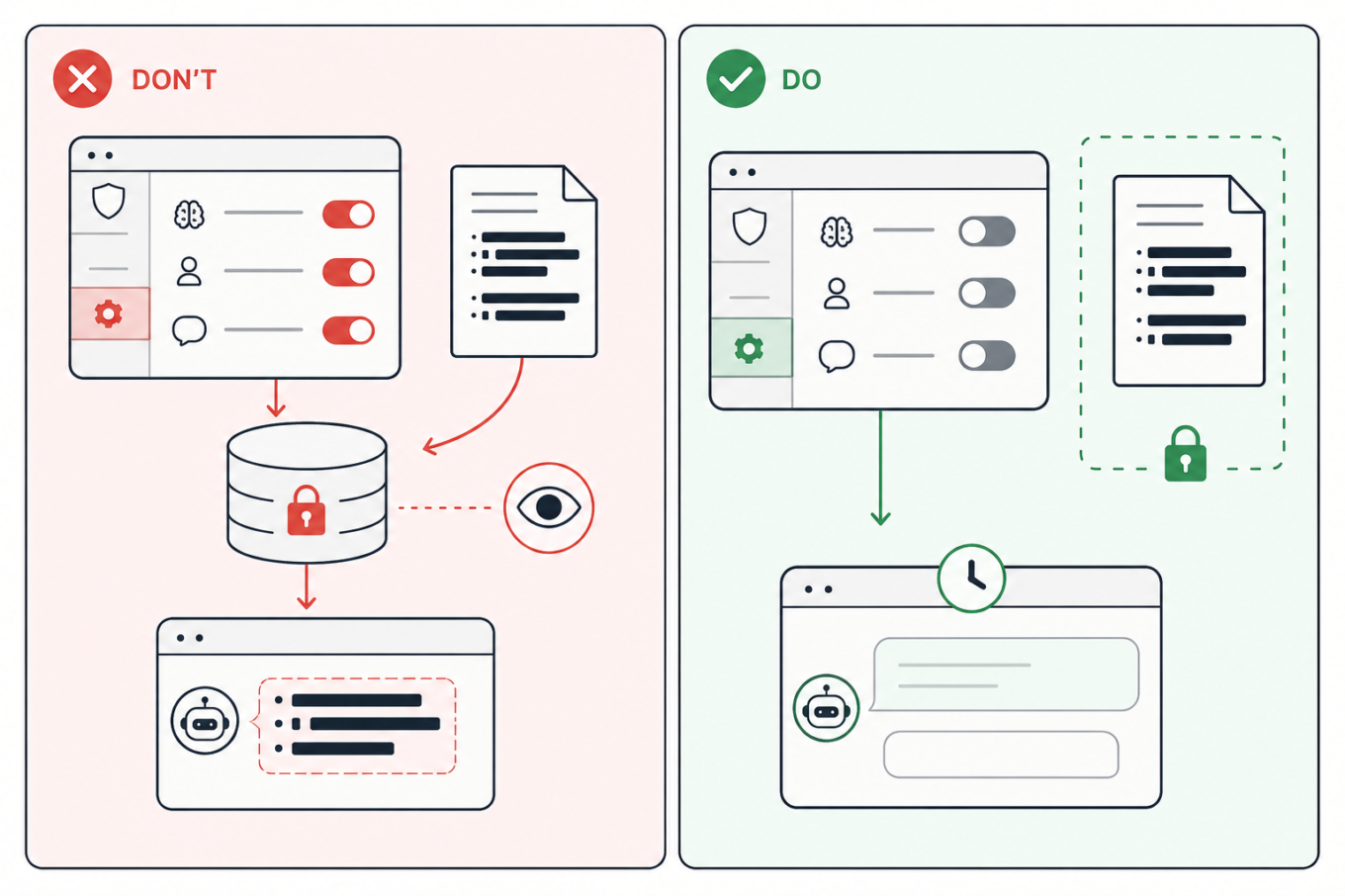
Turn off optional model training and other data-use settings, use a temporary chat when appropriate, and keep sensitive study files out of AI

7. Move the answer to a clean chat before sharing it

The situation: You ask AI to help with an assignment, gradually adding notes, files, and personal context. Once the useful answer is ready, you create a link to send it to a classmate or someone else.

What are the risks: A share link may reveal the whole conversation, not just the answer you meant to send. Anyone who opens it could also see earlier prompts, then forward or save them. Some public links may also appear in search results, either directly or after being posted elsewhere. This has already happened on a large scale: one researcher collected nearly 100,000 publicly shared ChatGPT conversations, while more than 370,000 Grok chats reportedly appeared in search results, some containing personal information, business files, and a password. Public Claude links reportedly exposed health records, internal documents, and children’s contact details too.

What to do: Avoid sharing the original study chat. The safest option is to copy only the answer you need into a separate document and share that. But if you want others to see that it came from AI, ask the same question again in a clean chat, and check the full sharing preview. Open the link in a private browser window to see what others will see. Delete the shared link when it is no longer needed but remember that this cannot erase copies someone has already saved.
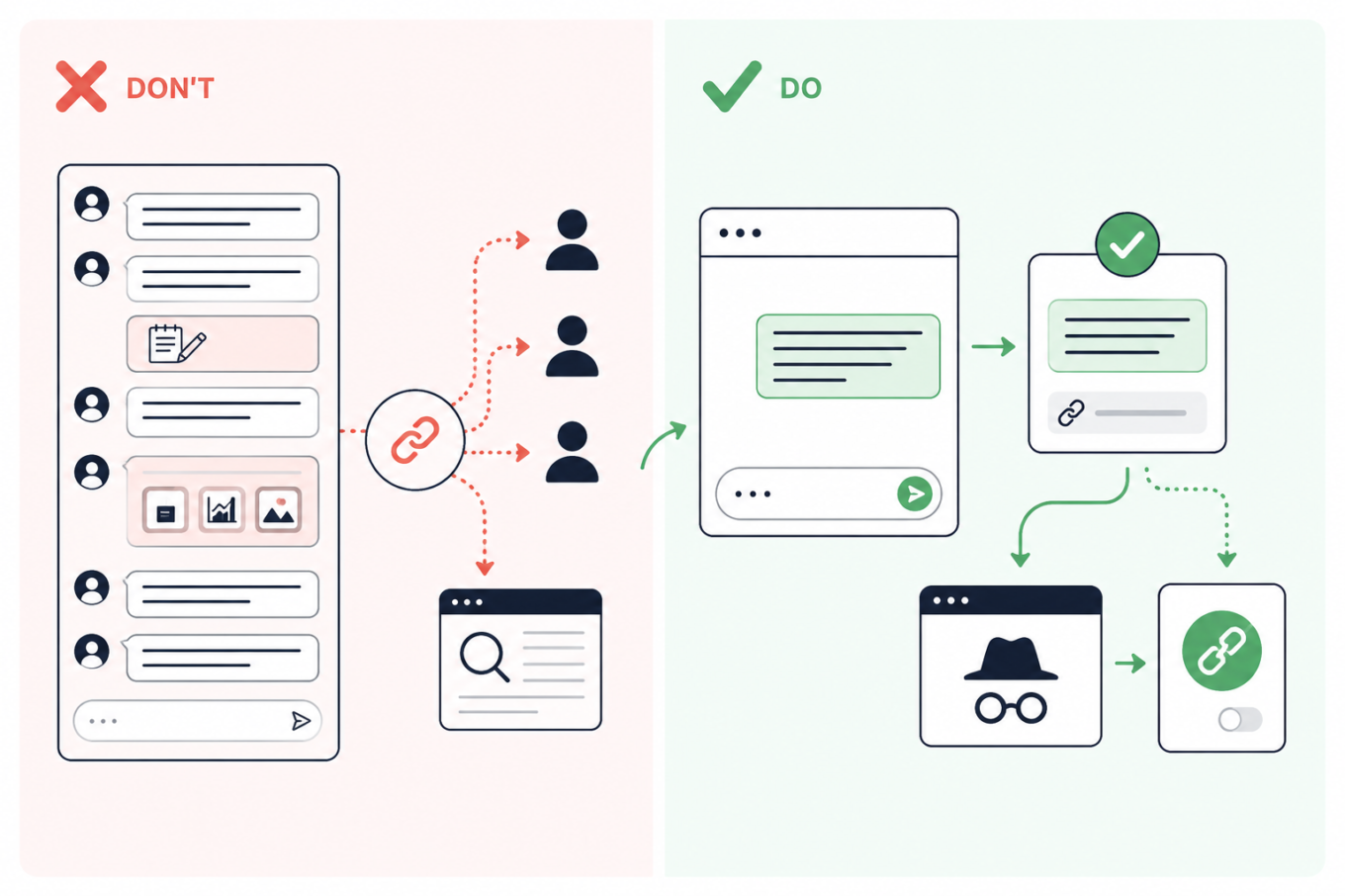
Don’t share a link to a long AI conversation; move the needed answer to a clean chat, preview the link privately, and revoke it after sharing

Páčil sa vám tento príspevok?
AdGuard VPN AdGuard DNS AdGuard Mail Peňaženka AdGuard
Hlavná obrazovka AdGuardu pre Windows
Obrazovka ochrany AdGuardu pre Windows zobrazujúca funkcie a nastavenia ochrany
Obrazovka so štatistikami v aplikácii AdGuard pre Windows, ktorá zobrazuje štatistiky blokovaných reklám a sledovacích programov
Obrazovka správy aplikácií v AdGuarde pre Windows zobrazujúca možnosti správy ochrany pre aplikácie nainštalované v zariadení
20 294 20294 hodnotení
Výborne!

AdGuard: blokovač reklam pre Windows

AdGuard pre Windows je viac než blokovač reklám. Je to viacúčelový nástroj, ktorý blokuje reklamy, kontroluje prístup k nebezpečným stránkam, zrýchľuje načítavanie stránok a chráni deti pred nevhodným obsahom
Stiahnutím programu akceptujete podmienky licenčnej zmluvy
Microsoft Store
Stiahnutím programu akceptujete podmienky licenčnej zmluvy
AdGuard pre Windows v8.0, 14-dňová skúšobná doba
Hlavná obrazovka AdGuardu pre Mac
Obrazovka Režimu utajenia v aplikácii AdGuard pre Mac
20 294 20294 hodnotení
Výborne!

AdGuard: blokovač reklám pre Mac

AdGuard pre Mac je unikátny blokovač reklám navrhnutý pre macOS. Okrem ochrany pred otravnými reklamami v prehliadačoch a aplikáciách Vás chráni aj pred sledovaním, phishingom a podvodmi
Stiahnutím programu akceptujete podmienky licenčnej zmluvy
Prečítať si viac
AdGuard pre Mac v2.19, 14-dňová skúšobná doba
Hlavná obrazovka AdGuardu pre Android
Obrazovka ochrany pred sledovaním v aplikácii AdGuard pre Android
Obrazovka správy aplikácií v AdGuarde pre Android, ktorá zobrazuje možnosti správy ochrany pre aplikácie nainštalované v zariadení
Obrazovka so štatistikami aplikácie AdGuard pre Android, ktorá zobrazuje štatistiky blokovaných reklám a sledovacích programov
Hlavná obrazovka súkromného prehliadača AdGuard pre Android
QR kód na stiahnutie AdGuardu pre Android
20 294 20294 hodnotení
Výborne!

AdGuard: blokovač reklám pre Android

Blokuje reklamy a sledovače vo všetkých prehliadačoch, hrách a iných aplikáciách. Chráni Vaše súkromie a umožňuje Vám kontrolovať, ako Vaše aplikácie používajú internet. Inštaluje sa cez APK
Stiahnutím programu akceptujete podmienky licenčnej zmluvy
Prečítať si viac
Naskenujte a stiahnite
Použite akúkoľvek čítačku QR kódov dostupnú vo Vašom zariadení.
AdGuard pre Android v4.14, 14-dňová skúšobná doba
Hlavná obrazovka AdGuardu pre iOS
Obrazovka ochrany AdGuardu pre iOS zobrazujúca funkcie a nastavenia ochrany
Obrazovka so štatistikami v aplikácii AdGuard pre iOS, ktorá zobrazuje štatistiky blokovaných reklám a sledovačov
QR kód na stiahnutie AdGuardu pre iOS
20 294 20294 hodnotení
Výborne!

AdGuard: blokátor reklám pre iOS

Najlepší blokovač reklám pre iOS na iPhone a iPad. AdGuard eliminuje všetky druhy reklám a sledovacích nástrojov v prehliadači Safari a chráni Vaše súkromie vo všetkých aplikáciách na úrovni DNS.


Stiahnutím programu akceptujete podmienky licenčnej zmluvy
Prečítať si viac
Naskenujte a stiahnite
Použite akúkoľvek čítačku QR kódov dostupnú vo Vašom zariadení.
AdGuard pre iOS v4.5
Hlavná obrazovka blokovača obsahu AdGuard
Obrazovka filtrov blokovača obsahu AdGuard
Obrazovka nastavení blokovača obsahu AdGuard
20 294 20294 hodnotení
Výborne!

AdGuard blokovač obsahu

Blokovač obsahu AdGuard eliminuje všetky druhy reklám v mobilných prehliadačoch, ktoré podporujú technológiu blokovania obsahu – konkrétne v prehliadačoch Samsung Internet a Yandex Browser. Jeho funkcie sú v porovnaní s AdGuardom pre Android obmedzené, ale je bezplatný, ľahko sa inštaluje a je efektívny
Stiahnutím programu akceptujete podmienky licenčnej zmluvy
Prečítať si viac
AdGuard blokovač obsahu v2.8
Hlavná obrazovka rozšírenia prehliadača AdGuard
Obrazovka ochrany pred sledovaním rozšírenia prehliadača AdGuard
20 294 20294 hodnotení
Výborne!

AdGuard rozšírenie prehliadača

AdGuard je najrýchlejší a najľahšie rozšírenie pre blokovanie reklám, ktoré účinne blokuje všetky typy reklám na všetkých webových stránkach! Vyberte si AdGuard pre prehliadač, ktorý používate, a získajte rýchle a bezpečné prehliadanie bez reklám.
Inštalovať
Stiahnutím programu akceptujete podmienky licenčnej zmluvy
Inštalovať
Stiahnutím programu akceptujete podmienky licenčnej zmluvy
Inštalovať
Stiahnutím programu akceptujete podmienky licenčnej zmluvy
Inštalovať
Stiahnutím programu akceptujete podmienky licenčnej zmluvy
Inštalovať
Stiahnutím programu akceptujete podmienky licenčnej zmluvy
Prečítať si viac
Inštalovať
Stiahnutím programu akceptujete podmienky licenčnej zmluvy
Prečítať si viac
AdGuard rozšírenie prehliadača v5.5
Hlavná obrazovka AdGuard Assistant
20 294 20294 hodnotení
Výborne!

Asistent AdGuard

Rozšírenie prehliadača pre desktopové aplikácie AdGuard. Umožňuje vám blokovať vlastné položky na webových stránkach, pridávať webové stránky na zoznam povolených a odosielať hlásenia priamo z prehliadača
Asistent AdGuard v1.4
20 294 20294 hodnotení
Výborne!

AdGuard Home

AdGuard Home je sieťové riešenie na blokovanie reklám a sledovacích programov. Nainštalujte si ho raz na smerovač, aby ste pokryli všetky zariadenia vo Vašej domácej sieti – nie je potrebný žiadny ďalší klientsky softvér. Toto je obzvlášť dôležité pre rôzne zariadenia internetu vecí, ktoré často predstavujú hrozbu pre Vaše súkromie
AdGuard Home v0.107
Hlavná obrazovka AdGuard Pro pre iOS
Obrazovka ochrany AdGuard Pro pre iOS zobrazujúca funkcie a nastavenia ochrany
Obrazovka so štatistikami AdGuard Pro pre iOS, ktorá zobrazuje štatistiky blokovaných reklám a sledovacích nástrojov
20 294 20294 hodnotení
Výborne!

AdGuard Pro pre iOS

AdGuard Pro pre iOS obsahuje všetky pokročilé funkcie ochrany proti blokovaniu reklám. Ponúka rovnaké nástroje ako platená verzia AdGuardu pre iOS. Vyniká v blokovaní reklám v prehliadači Safari a umožňuje Vám prispôsobiť nastavenia DNS pre Vašu ochranu. Blokuje reklamy v prehliadačoch a aplikáciách, chráni Vaše deti pred nevhodným obsahom a chráni aj Vaše osobné údaje
Stiahnutím programu akceptujete podmienky licenčnej zmluvy
Prečítať si viac
AdGuard Pro pre iOS v4.5
Hlavná obrazovka AdGuard Mini pre Mac
Obrazovka ochrany Safari v AdGuard Mini pre Mac
Obrazovka Vytvorenie pravidla v aplikácii AdGuard Mini pre Mac
20 294 20294 hodnotení
Výborne!

AdGuard Mini pre Mac — blokovanie reklám v Safari

AdGuard Mini pre Mac je výkonný blokovač reklám pre Safari. Táto ľahká aplikácia odstraňuje reklamy, blokuje sledovače a zrýchľuje načítavanie stránok. Pomáha vám prehliadať web v Safari bez rozptýlení a chráni vaše dáta
Inštalovať
Stiahnutím programu akceptujete podmienky licenčnej zmluvy
Prečítať si viac
AdGuard Mini pre Mac v2.3
Hlavná obrazovka AdGuard pre Android TV so zapnutou ochranou
Obrazovka blokovania reklám aplikácie AdGuard pre Android TV zobrazujúca jej funkcie a nastavenia
Obrazovka nastavení AdGuardu pre Android TV
Obrazovka správy aplikácií AdGuard pre Android TV zobrazujúca aplikácie, v ktorých sú blokované reklamy a sledovače
20 294 20294 hodnotení
Výborne!

AdGuard pre Android TV

AdGuard pre Android TV je jediná aplikácia, ktorá blokuje reklamy, chráni Vaše súkromie a funguje ako firewall pre Váš Smart TV. Dostávajte upozornenia na webové hrozby, používajte zabezpečené DNS a profitujte zo šifrovanej prevádzky. Uvoľnite sa a ponorte sa do svojich obľúbených relácií so špičkovým zabezpečením a žiadnymi reklamami!
AdGuard pre Android TV v4.14, 14-dňová skúšobná doba
Maskot AdGuardu, Agnar, drží tučniaka s Linuxom
20 294 20294 hodnotení
Výborne!

AdGuard pre Linux

AdGuard pre Linux je celosvetovo prvý systémový blokovač reklám pre Linux. Blokujte reklamy a sledovače na úrovni zariadenia, vyberte si z predinštalovaných filtrov alebo pridajte svoje vlastné – to všetko cez rozhranie príkazového riadka
AdGuard pre Linux v1.4
20 294 20294 hodnotení
Výborne!

AdGuard Temp Mail

Bezplatný generátor dočasných e-mail adries, ktorý Vás udržiava v anonymite a chráni Vaše súkromie. Žiadny spam vo Vašom hlavnom priečinku doručenej pošty!
20 294 20294 hodnotení
Výborne!

AdGuard VPN

75 lokalít po celom svete

Prístup k ľubovoľnému obsahu

Silné šifrovanie

Neukladajú sa žiadne záznamy

Najrýchlejšie pripojenie

Non-stop podpora

Vyskúšajte bezplatne
Stiahnutím programu akceptujete podmienky licenčnej zmluvy
Prečítať si viac
20 294 20294 hodnotení
Výborne!

AdGuard DNS

AdGuard DNS je alternatívne riešenie pre blokovanie reklám, ochranu súkromia a rodičovskú kontrolu. Jednoduché nastavenie a bezplatné používanie poskytuje potrebné minimum ochrany proti online reklamám, sledovačom a phishingu bez ohľadu na to, akú platformu a zariadenie používate.
20 294 20294 hodnotení
Výborne!

AdGuard Mail

Chráňte svoju identitu, vyhýbajte sa spamu a udržujte svoju doručenú poštu v bezpečí pomocou našich aliasov a dočasných e-mailových adries. Užite si našu bezplatnú službu preposielania e-mail správ a aplikácie pre všetky operačné systémy
20 294 20294 hodnotení
Výborne!

Peňaženka AdGuard

Bezpečná a súkromná krypto peňaženka, ktorá Vám poskytuje plnú kontrolu nad Vašimi aktívami. Spravujte viacero peňaženiek a objavte tisíce kryptomien na ukladanie, odosielanie a výmenu
Sťahovanie AdGuard Ak chcete spustiť inštaláciu, kliknite na tlačidlo označené šípkou Vyberte možnosť "Otvoriť" a kliknite na tlačidlo "OK" - chvíľu počkajte, kým sa súbor stiahne. V otvorenom okne pretiahnite ikonu AdGuard do priečinka "Aplikácie". Ďakujeme, že ste si vybrali AdGuard! Vyberte možnosť "Otvoriť" a kliknite na tlačidlo "OK" - chvíľu počkajte, kým sa súbor stiahne. V otvorenom okne kliknite na "Inštalovať". Ďakujeme, že ste si vybrali AdGuard!
Nainštalujte AdGuard na Vaše mobilné zariadenie













































